Advertisement
Amazon S3 has become one of the most widely used services for storing files in the cloud. For developers, businesses, and even casual users, it offers a simple way to keep data safe while making it accessible from anywhere. But with that convenience comes the question of how it stays secure.
Many people use S3 without fully understanding what happens behind the scenes, particularly when it comes to securing sensitive information. This article explains how AWS S3 buckets work, how they store your data, and how the security model ensures only the right people get access.
At its core, S3 is a storage service that organizes data in what it calls “buckets.” A bucket is essentially a container for files, which S3 refers to as “objects.” When you create a bucket, you give it a globally unique name and pick a region where it lives. The region matters because it determines the physical location of your data and can improve access speed or help comply with local data laws.
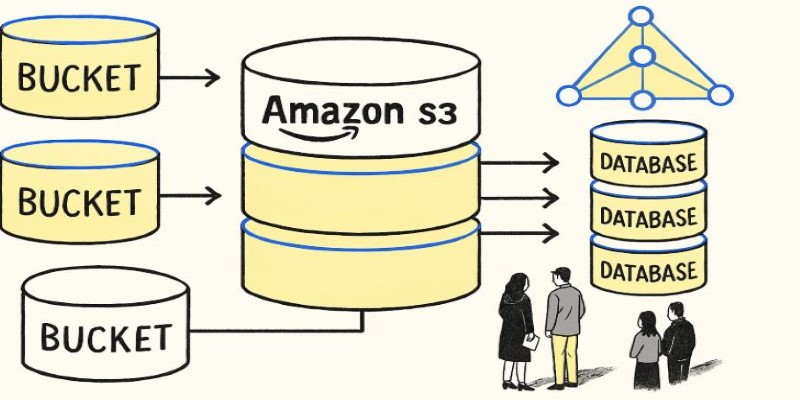
Inside a bucket, you can store an unlimited number of objects. Each object has its key (like a file path) and metadata. Buckets themselves do not have folders, although AWS allows you to simulate folder structures by naming your objects with slashes (e.g., photos/2025/july/pic1.jpg). This flat structure makes it easy to scale to billions of objects without worrying about traditional file system limits.
One of the reasons S3 is popular is its durability. AWS claims eleven nines (99.999999999%) of durability, achieved by automatically replicating your data across multiple servers and even facilities within the chosen region. So even if a physical server fails, your data remains intact and accessible.
Buckets are private by default. When you create a new bucket, no one except the owner has access, not even AWS staff. You decide who can read, write, or manage the data inside. This is done through several mechanisms: bucket policies, IAM policies, access control lists (ACLs), and sometimes pre-signed URLs.
Bucket policies are JSON documents you attach to a bucket. They define who can do what, specifying permissions based on AWS account, user, or role. IAM (Identity and Access Management) policies work at the user or group level instead of directly on the bucket. You can use IAM to create fine-grained roles and permissions, then apply them to people or applications that need access.
ACLs are older and less flexible. They let you set permissions at the object or bucket level, but most best-practice guidelines recommend using bucket policies and IAM for better control. Finally, pre-signed URLs allow temporary access to a specific object, which is useful for sharing files securely without changing the bucket’s broader permissions.
These options can seem overwhelming at first, but they all fit the same principle: least privilege. Only give as much access as someone needs, no more.
In addition to access controls, AWS S3 offers encryption to protect your data at rest and in transit. Encryption in transit is handled through HTTPS when you upload or download files. This ensures no one can intercept and read your data as it moves between your device and AWS servers.

For data at rest, you can enable server-side encryption. AWS gives you a few options. The simplest is SSE-S3, where AWS manages all the keys for you. SSE-KMS is more advanced, using the AWS Key Management Service, so you can control and audit the encryption keys yourself. There is also SSE-C, where you supply your encryption key every time you access the object, giving you full responsibility for the key's safety.
Encryption is transparent to the user: you don’t have to change how you upload or retrieve data. AWS handles it in the background, ensuring your files remain secure even if someone somehow gains unauthorized access to the storage hardware.
Another layer of security is versioning. When you enable versioning on a bucket, S3 keeps every version of an object whenever it’s overwritten or deleted. This protects against accidental loss or tampering, as you can roll back to an earlier version whenever needed.
No security model is complete without visibility. S3 integrates with AWS CloudTrail to log every action taken on your buckets and objects. This means you can track who accessed what and when. These logs can help detect unauthorized activity or mistakes before they become serious problems.
Another feature is S3 Access Analyzer. This tool scans your bucket policies and highlights any configurations that make your data publicly accessible. Many data leaks in the past have happened because someone misconfigured their S3 permissions, leaving sensitive data exposed. Regularly reviewing the Access Analyzer output is a simple way to catch those errors.
Good practice also involves configuring bucket versioning, enabling MFA delete (so a multi-factor authentication token is required to delete objects), and setting up lifecycle policies to automatically delete or archive older data that no longer needs to be in active storage. Combining all of these features helps maintain a clean, secure, and cost-effective storage setup.
AWS S3 buckets make cloud storage straightforward, but keeping that storage secure requires understanding how the service works. Buckets organize your files as objects and protect them with several layers of access control and encryption. You have full control over who can access your data and how, while AWS provides tools to help you monitor and protect it. Encryption and versioning add further safeguards, and monitoring tools give you visibility into what’s happening in your storage. With these pieces working together, you can store even sensitive information on S3 with confidence, knowing both availability and security are well addressed.
Advertisement

Learn key strategies for prompt engineering to optimize AI language models and improve response accuracy and relevance

Learn how AI innovations in the Microsoft Cloud are transforming manufacturing processes, quality, and productivity.

How AI Policy @Hugging Face: Open ML Considerations in the EU AI Act sheds light on open-source responsibilities, developer rights, and the balance between regulation and innovation
Discover how observability and AIOps transform IT operations with real-time insights, automation, and smart analytics.

Can machines truly think like us? Discover how Artificial General Intelligence aims to go beyond narrow AI to learn, reason, and adapt like a human

Why AI training is increasingly being shaped by tech giants instead of traditional schools. Explore how hands-on learning, tools, and real-time updates from major tech companies are changing the way people build careers in AI

Discover why technical management continues to play a critical role in today's AI-powered workspaces. Learn how human leadership complements artificial intelligence in modern development teams

Compare AI, ML, DL, and Generative AI to understand their differences and applications in technology today

How to use a Python For Loop with easy-to-follow examples. This beginner-friendly guide walks you through practical ways to write clean, effective loops in Python

OpenAI robotics is no longer speculation. From new hires to industry partnerships, OpenAI is preparing to bring its AI into the physical world. Here's what that could mean

Explore statistical learnability of strategic linear classifiers with simple walkthroughs and practical AI learning concepts

What happens when energy expertise meets AI firepower? Schneider Electric and Nvidia’s partnership is transforming how factories are built and optimized—from virtual twins to real-world learning systems